proof

pull one before the run

20 HP

The line's test module. A printer pulls a proof before the print run to see that everything comes out right; PROOF does that for an idea. Every part the line's boards are made of, on one board behind plain knobs, jacks and lights, so a new sound can be heard on real hardware before its own board is drawn and paid for.

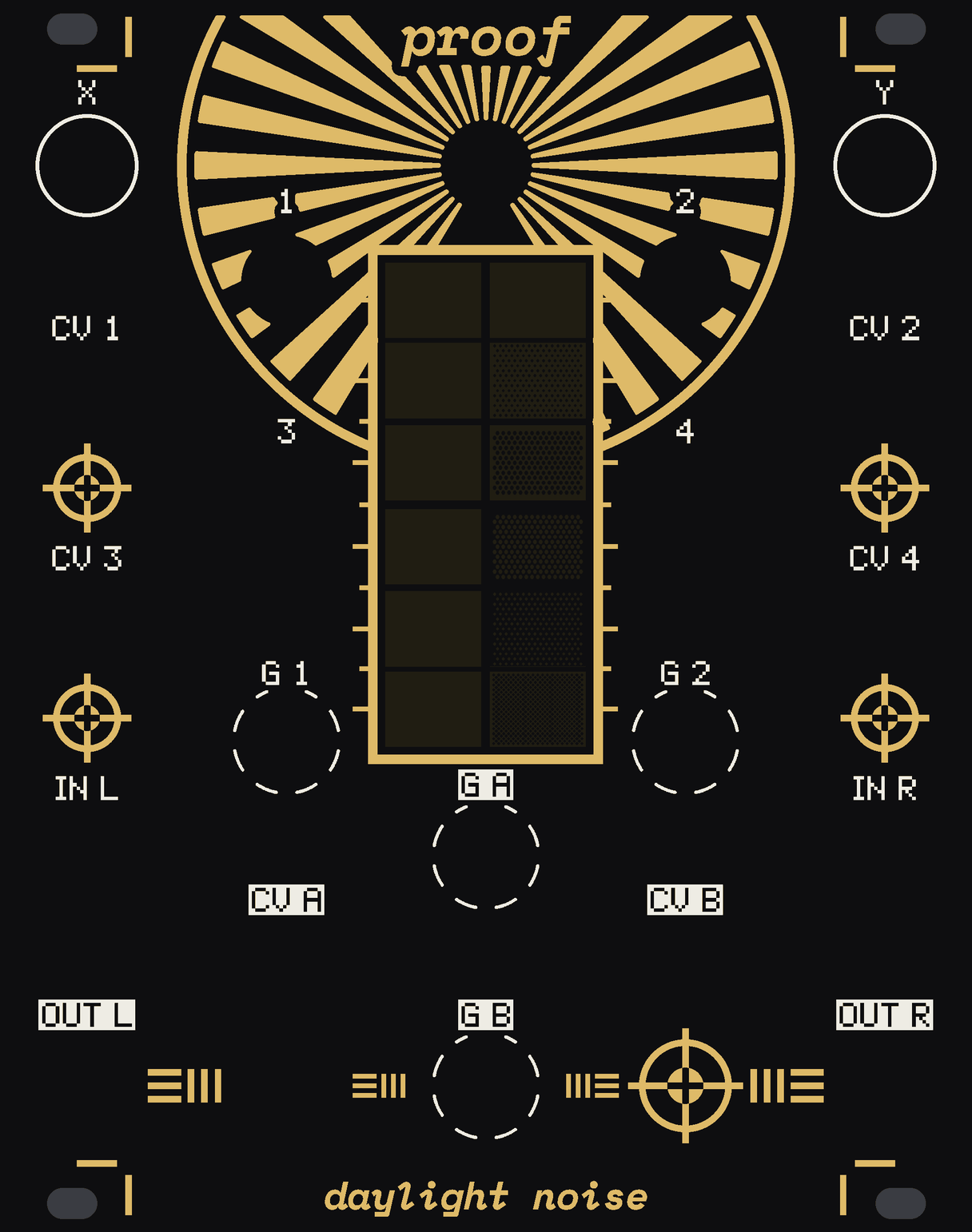
The PROOF panel: black and gold, drawn as a printer's proof sheet. A big target of gold and black wedges fans out round the encoder at the top, with registration crosses down both sides, crop marks in the corners and rows of fine bars along the foot. Down the middle a gold-framed strip of twelve squares, two columns of six, some of them dotted. Jacks down both sides and along the foot, four knobs and two buttons; at the foot a yellow RCA socket under CV A, and opposite it a gold target the same size.

Turn a knob: drag it or tap either side of it, roll the wheel over it or use the arrow keys; a double click puts it back. The big knob turns the same ways, a BPM a click; press it (Enter, or tap its middle) to stop and start. X strikes, Y holds the echo. The patches step on by themselves until you touch anything.

FIRST, the program PROOF ships with. Press X, or the big knob, while it plays.

VIDEO · composite, black and white · 320 × 240, 60 frames a second

example patches

FIRST here is the same program the module runs, number for number, in your browser. BEEPS, the loop it's clocked by and the drums it echoes, is a stand-in rack.

Every part of the line on one board

The line's modules share a platform: the same brain and the same few chips for sound in, sound out, control voltages and lights. But each board is wired for its own panel, so none of them makes a good place to try something new. PROOF carries every one of those parts at once, behind a general set of controls whose jobs change with each idea. It has three jobs.

FIRST

Out of the box PROOF plays FIRST, a small instrument where every part of the board makes a sound or moves a light, so a newly built one shows at once what works. Plug OUT L and OUT R into your speakers and it plays: a plucked, folded tone on every beat, with an echo behind it.

The strip

The twelve squares down the middle are lit from behind, each by its own light, and show what's happening by how bright they are. One with nothing to show glows low rather than going dark.

How to try an idea on PROOF

An idea on PROOF is a sound program and a map: one small file that says what each knob, jack, button and light means to it. The numbers come to it in plain units (knobs from 0 to 1, voltages in volts), so you needn't know the board.

  1. Plug PROOF into your computer by its USB socket. It can stay in your case, powered from the rack.
  2. Copy the blank map to a file with your idea's name and fill it in: your knobs, your jacks, what the lights show. As it comes, the blank map plays a little test of its own, so you can hear a map working before you write yours. A module from the bench needs only its map; its own sound program is used exactly as it is. Two already run this way: CONTORT and MONOLITH.
  3. Build it with one command, make rp2350 MAP=yourname.
  4. Load it with picotool load -f -x and the file the build made. There's no button to hold: PROOF restarts into your idea in a few seconds.
  5. Watch it over the same USB cable: PROOF shows up as a serial port, and typing mon in any serial terminal gives a live line of every knob, input and output, as numbers, while you play.

A picture too. An idea can draw on the TV. video.h gives a map a 320 × 240 frame of greys to draw into and a hook called once a frame, with a few helpers for boxes, lines, circles and text. The hook draws from a copy of the map's state, so the sound never waits for it. The blank map draws a small test card of its own; a map that draws nothing leaves the TV black.

If an idea ever stops PROOF answering, take it out of the case: hold the small BOOTSEL button on the board's front by the USB socket, tap RESET beside it, and PROOF shows up as a drive to drop another program onto.

The self-test checks a board end to end. Hold X while you power up, patch six cables (OUT L to IN L, OUT R to IN R, CV A to CV 1, CV B to CV 2, G A to G 1, G B to G 2) and each pair's square goes amber while it checks, then green for a pass or red for a fail; then CV A to CV 3 and CV B to CV 4. The white squares fill as you turn each knob end to end, turn the big knob both ways and press each button, and every number prints over USB. With a TV on VIDEO it shows a test card, grey steps from black to white. Hold X and Y together to leave it. A calibration with a multimeter that reads to a millivolt sets the CVs to a couple of cents, and is kept through a power cycle; without a meter, the CV ins and outs still agree with each other.
What comes out

Specs

Format

Width
20 HP
Controls
a big endless encoder with a push, four knobs, two lit buttons
Lights
twelve squares: six in any colour, six white, each lit by its own light; the buttons' own lights

Inputs

CV 1, CV 2
CV, each good to a couple of cents after calibration
CV 3, CV 4
CV, the same
G 1, G 2
gates, each change timed to the sample
IN L, IN R
audio
Cable in
every input knows when a cable is in it

Outputs

OUT L, OUT R
audio
CV A, CV B
CV, at least −5 to +8 V, good to a couple of cents after calibration
G A, G B
gates, 0 or 5 V
VIDEO (RCA)
composite video, black and white, 320 × 240; NTSC or PAL (hold Y at power-up to switch; kept)

Engine

Brain
RP2350B, with 8 MB of extra memory for long delays and samples
USB
loads a new program while it runs, and talks to your computer
Expansion
a header on the back for trying a new chip on a small add-on board